

TL;DR:
- Most aspiring authors fail not because they lack good ideas, but because they lack a functional writing system. AI-assisted workflows can significantly reduce book production time from months to weeks, enabling faster and higher-quality publication. Establishing preparation, outlines, and tracking systems before drafting ensures steady progress and minimizes stalls during the writing process.
Most aspiring authors don't fail because they lack a good idea. They fail because they lack a working system. A scattered book writing workflow 2026 authors rely on means starting strong in January, losing momentum by March, and watching the manuscript collect digital dust by summer. The good news? AI-assisted workflows now cut book writing time from 6 to 12 months down to roughly 4 to 6 weeks, without sacrificing quality. This guide walks you through exactly how to build and follow that kind of system, from your first idea to your final uploaded file.
Table of Contents
- Key takeaways
- Your book writing workflow 2026 starts with preparation
- From ideation to first draft: the step-by-step process
- Revision, editing, and AI-assisted quality improvement
- Formatting, publishing prep, and distribution in 2026
- Common mistakes and how to stay productive
- My honest take on AI and the craft of writing
- Take your writing further with Librida
- FAQ
Key takeaways
| Point | Details |
|---|---|
| Preparation prevents wasted time | Clarifying your book type, audience, and tools before writing saves weeks of rework later. |
| Outlines drive drafts | A detailed chapter outline removes decision fatigue and keeps your daily writing sessions focused and productive. |
| AI accelerates editing | Structural audits and AI scoring passes can cut revision time by over 50% when applied before deep line editing. |
| Formatting errors start upstream | Cleaning your manuscript structure before formatting avoids compounding errors during KDP preparation. |
| One status per project item | Using a strict workflow status system (IDEA, DRAFT, REVISION) prevents stalling and writer's block. |
Your book writing workflow 2026 starts with preparation
Before you write a single sentence of chapter one, you need to answer three questions: What kind of book is this? Who is it for? And what tools will carry it from idea to publication?
These questions sound obvious, but skipping them is the single most common reason first drafts stall. A non-fiction guide for professionals reads differently than a personal development memoir, and the workflow you build around it should reflect that distinction.
Choosing your tools and setting up your environment
The digital writing tools available in 2026 range from minimalist distraction-free editors to full AI co-writing platforms. Here is a practical breakdown of what to consider when choosing:
- Drafting tools: Scrivener and Google Docs remain popular for organization and portability. AI-native platforms like Librida integrate writing, feedback, and publishing prep in one place.
- Outline tools: Notion or a simple spreadsheet work well for tracking chapter summaries, character arcs, and word count targets.
- AI assistance: Use AI for brainstorming, drafting chapter sections, and providing editorial feedback. Think of it as a collaborator, not a ghostwriter.
- Project tracking: Assign each chapter or section a status tag: IDEA, OUTLINE, DRAFT, REVISION, or PUBLISHED. Explicit status tracking dramatically reduces stalling and keeps your momentum visible.
| Tool type | Best for | Example |
|---|---|---|
| Distraction-free editor | Raw drafting sessions | iA Writer, Draft |
| Full manuscript organizer | Complex projects with multiple chapters | Scrivener |
| AI writing platform | Drafting, feedback, and workflow integration | Librida |
| Project tracker | Status management and deadlines | Notion, Airtable |
Pro Tip: Set up your writing environment before Day 1. Create folder structures, name your chapter files consistently, and build your status tracker. Twenty minutes of setup saves hours of confusion mid-project.
From ideation to first draft: the step-by-step process
This is where the 2026 book writing process diverges most sharply from how writers worked a decade ago. The anchor-and-expand method, combined with AI tools, lets you move from a premise to a complete first draft in a fraction of the traditional time.
- Define your premise in one sentence. If you cannot summarize your book in a single sentence, you do not have a clear enough concept yet. Use AI to stress-test your premise by asking it to identify gaps, target audience mismatches, or weak hooks.
- Build a chapter-level outline. Each chapter needs a one-sentence purpose and a rough word count target. For a 60,000-word non-fiction book, that usually means 12 to 15 chapters at 4,000 to 5,000 words each. Fiction needs scene-level breakdowns within each chapter to maintain pacing.
- Draft chapter by chapter using the anchor-and-expand method. Write your anchor: a 200-to-300-word rough summary of the chapter's core argument or scene. Then use AI to help expand each anchor into a full draft, maintaining your voice by providing style samples.
- Set daily or weekly word count targets. Consistency beats intensity. Writing 1,000 words daily produces a 60,000-word first draft in two months. Sprinting 10,000 words in a weekend and burning out produces nothing.
- Do not edit while drafting. Mark passages that need work with a bracket note like [REVISIT] and keep moving. Stopping to polish mid-draft kills momentum and often produces writing you will cut anyway.
- Use AI for voice consistency checks. After every few chapters, paste a recent passage and an earlier one into your AI tool and ask whether the voice, tone, and reading level feel consistent.
Pro Tip: Save your AI prompts as reusable templates. Persistent AI prompt contexts help you maintain style and voice across long writing sessions without re-explaining your book every time you start a new conversation.
Revision, editing, and AI-assisted quality improvement
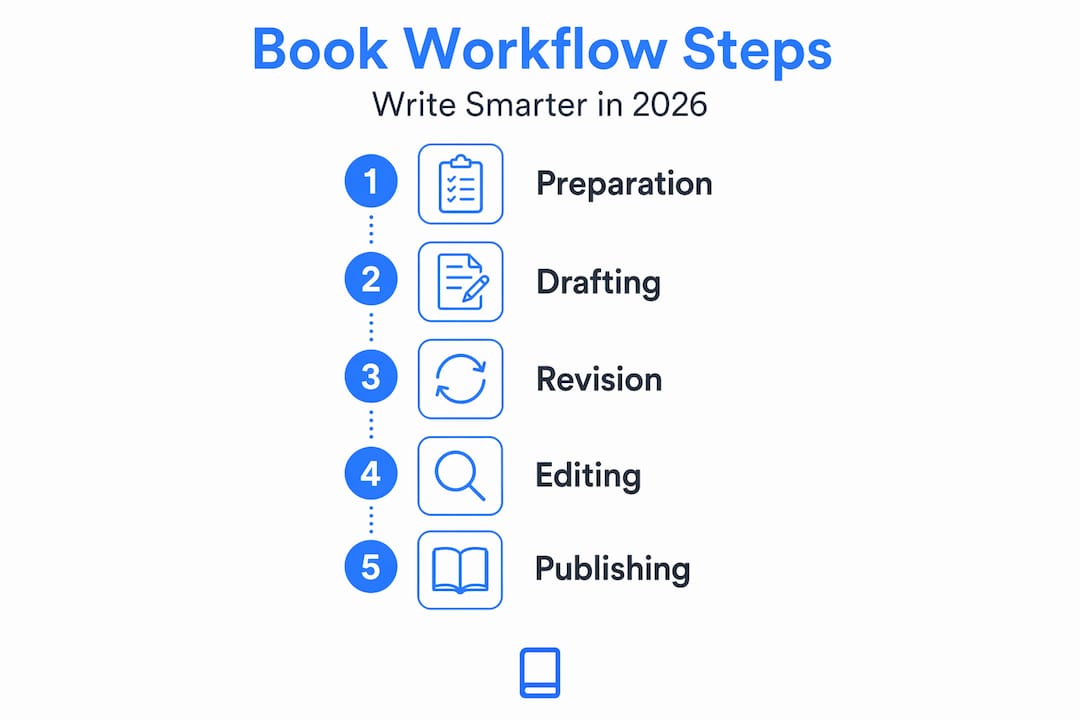
The first draft is not the book. Most writers understand that intellectually, but they still rush into formatting the moment they type the last sentence. Resist that urge. Your revision stage is where the book actually gets written in the truest sense.

The most effective approach is to move through three distinct passes before touching line-level grammar.
Structural pass first. Read through the entire manuscript looking only at big-picture problems. Are chapters in the right order? Does the argument or plot build logically? Are there sections that repeat what was already covered? Fix these issues before anything else, because moving paragraphs around after you have polished every sentence is demoralizing and wasteful.
AI critique pass second. Paste chapter sections into your AI tool with a specific prompt: ask it to identify pacing problems, flag unclear transitions, and rate the hook strength of your opening paragraphs. The Claude Draft System applies scoring across five dimensions: hook strength, clarity, argument density, tone consistency, and closing strength. Applying a similar framework to your chapters surfaces problems you would otherwise miss.
Line editing pass third. Only once structure and content are solid should you focus on sentence-level clarity, word choice, and grammar. This order prevents the soul-crushing experience of spending hours polishing a paragraph you later delete.
"Slow, iterative layering and immersive sensory experiences are what separate forgettable fiction from truly emotional storytelling." This principle, highlighted by author Rosie Walsh, applies to revision as much as drafting. Iterative layering in fiction means adding depth in each revision pass rather than trying to achieve perfection in the first draft.
One final word on AI-assisted editing: never directly modify the AI-generated draft artifacts you use as reference. Instead, rerun your editing prompts on fresh versions to keep your workflow reproducible across sessions.
Formatting, publishing prep, and distribution in 2026
Getting your manuscript formatted correctly is where many self-publishing authors lose days they did not budget for. The self-publishing workflow 2026 demands two separate files for KDP: a print-ready PDF for paperbacks and a clean, reflowable EPUB file for ebooks.
Here is the order of operations that minimizes rejection risk:
- Clean your manuscript upstream first. Fix double spaces, inconsistent heading styles, and hidden formatting marks before you ever open a formatting tool. Upstream manuscript cleanup prevents small errors from cascading into major formatting failures.
- Set correct margins for print. Gutter margins vary based on page count and must be calculated precisely for your trim size.
- Prepare your cover with correct bleed. KDP requires 0.125 inches of bleed beyond the trim size for edge-to-edge cover artwork.
- Run through the KDP formatting checklist. The 37-item KDP checklist takes 60 to 90 minutes to complete and catches the vast majority of issues before upload.
- Upload in the right order. Upload interior files before covers to catch content issues early. Prioritize the checks most likely to fail first.
| Format | File type | Key requirement |
|---|---|---|
| Ebook (Kindle) | Reflowable EPUB | Clean chapter breaks, no fixed layouts |
| Paperback | Print-ready PDF | Correct trim size, gutter margins, embedded fonts |
| Hardcover | Print-ready PDF | Same as paperback with adjusted spine width |
Pro Tip: Register your ISBN before uploading. An ISBN tied directly to a specific retailer limits your portability. A self-registered ISBN through Bowker gives you control across all distribution channels and future editions.
Common mistakes and how to stay productive
Even writers with good systems fall into predictable traps. Knowing them in advance puts you ahead of 90% of aspiring authors.
- Rushing the draft. Speed is great during the drafting phase, but rushing past foundational story or argument problems creates a mountain of revision work. Quality fiction especially benefits from slow, iterative layering rather than speed-written scenes.
- Ignoring status tracking. If you cannot tell at a glance whether a chapter is in DRAFT or REVISION status, your project will stall. Stale ideas without status should be demoted or deleted after roughly three weeks of inactivity.
- Skipping the voice guide. If you are writing fiction with multiple POV characters, or non-fiction with a distinct authorial persona, create a one-page voice guide before you start. It saves enormous time during revision.
- Rewriting prompts from scratch every session. Treat your best AI prompts as reusable skills. Save them in a document, label them by function, and load them at the start of each writing session.
- Skipping rest periods. Non-fiction writers benefit from writing a chapter weekly and then taking a month-long break before tackling a deeper revision. Your brain processes and solves narrative problems during rest that forced productivity cannot.
Pro Tip: Build a "next action" note at the end of every writing session. Write one sentence describing exactly where you stopped and what to do next. You will thank yourself every single time you sit back down.
My honest take on AI and the craft of writing
I have watched hundreds of aspiring authors approach AI writing tools the same way they approach a treadmill purchase: with enormous enthusiasm followed by quiet abandonment. The problem is not the tool. It is the expectation.
AI does not replace the judgment, empathy, and earned perspective that makes a book worth reading. What it does do, when used correctly, is remove the friction that stops most people from finishing. Outlining used to be the part where half of all writers quit. Now it is a two-hour collaborative session rather than a two-week blank-stare exercise.
My experience working with authors at various stages is that the writers who get the most from AI are the ones who treat it like a smart first reader, not an authority. They push back on its suggestions. They override its tone when it drifts generic. They use it to pressure-test their logic, not to replace it.
The writers who struggle are the ones who accept the first AI output and call it a draft. That path leads to generic, forgettable books that erode reader trust. Structured book planning strategies combined with your genuine voice will always beat a pure AI output.
Start with a small project. Write a 5,000-word essay or a short story using the workflow above. Learn where your friction points are before you commit to a full manuscript. Scale from there.
— Mikael
Take your writing further with Librida
If you are ready to put this workflow into practice, Librida has built a resource specifically for authors at exactly this stage. The AI-Powered Success: From Beginner to Pro guide available on Librida walks you through harnessing AI at every stage of your book writing process, from first premise to published file. It covers scoring frameworks, workflow setup, and the exact prompts that save experienced authors hours per project.

Librida also offers tools to help you manage your author workflow across drafting, revision, and publishing prep. Whether you are writing your first book or your fifth, the platform is built to meet you where you are and move you forward faster.
FAQ
How long does it take to write a book with an AI workflow in 2026?
With a structured workflow and AI assistance, most authors reduce book writing time to roughly 4 to 6 weeks, compared to the traditional 6 to 12 months, according to current workflow data.
What files do I need to self-publish on KDP in 2026?
KDP requires two separate files: a reflowable EPUB for ebooks and a print-ready PDF for paperbacks or hardcovers. Each has specific formatting requirements for margins, fonts, and chapter structure.
How do I keep my writing voice consistent when using AI tools?
Save a voice guide document with sample paragraphs and style notes before you start, then use it as reference in every AI session. Reusable AI prompt templates loaded at the start of each session also help maintain consistency across long projects.
What is the best order for editing a manuscript?
Tackle structure first, then AI critique passes for pacing and clarity, and save line-level grammar editing for last. This order prevents wasted effort polishing content that may later be cut or reorganized.
Do I need my own ISBN to self-publish?
You do not need one to upload to KDP, but self-registering your ISBN through a provider like Bowker gives you full control over distribution channels and protects your portability if you move to other platforms or release future editions.